15 min read
The OpenClaw Mental Model: Gateways, Nodes, Agents, and the Runtime
Most people install OpenClaw and use 10% of it. Understanding the three-layer architecture that makes OpenClaw an autonomous agent platform.
15 min read
The OpenClaw Mental Model: Gateways, Nodes, Agents, and the Runtime
Most people install OpenClaw and use 10% of it. This article is the other 90%.
Why the mental model matters
You can get OpenClaw running without understanding any of this. The wizard holds your hand, Telegram connects, the agent replies. Congratulations, you have a chatbot.
But OpenClaw isn't a chatbot. It's a runtime for persistent autonomous agents. The gap between "chatbot user" and "power user" is exactly the mental model we're about to build.
Three layers. Everything else is a detail.
Layer 1 — The Gateway: your control plane
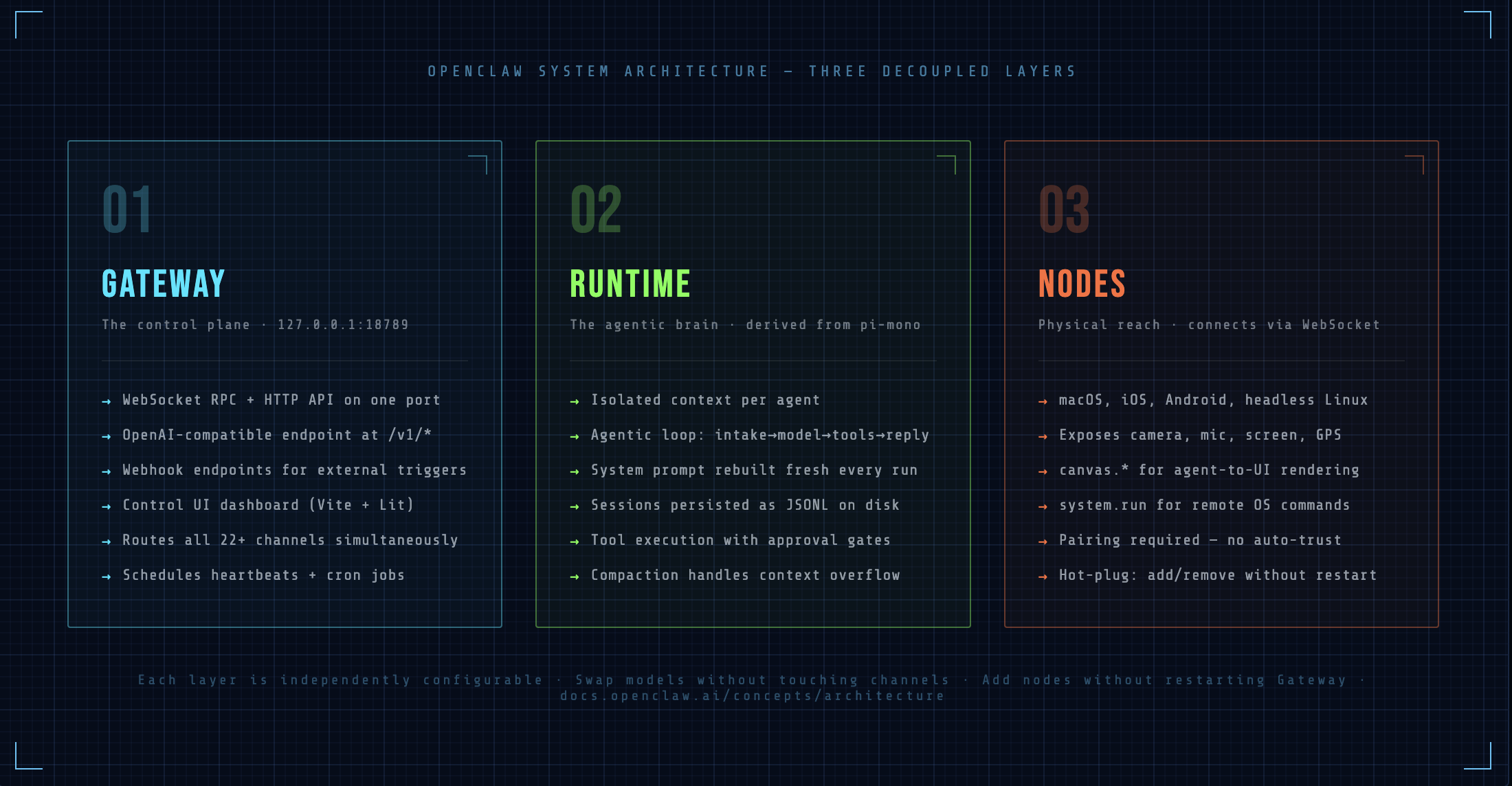
The Gateway is a single long-lived daemon. One process. It runs on 127.0.0.1:18789 by default and never stops (assuming your daemon is installed correctly).
What makes this interesting is what it's actually doing on that one port. The Gateway multiplexes all of the following simultaneously:
- WebSocket RPC — typed bidirectional communication for all connected clients (nodes, the Control UI, external tools)
- HTTP API — including an OpenAI-compatible endpoint at
/v1/*so any tool that speaks OpenAI can talk to your agent - Tools Invoke API at
/tools/invoke— for triggering specific tools externally - Webhook endpoints at
/hooks/wakeand/hooks/agent— for external event triggers - Control UI — the Vite + Lit SPA dashboard, served directly from the same port
- Health endpoints at
/healthzand/readyz
One port. All of that. This is intentional — it makes deployment, firewalling, and reverse proxying trivially simple.
The WebSocket protocol
If you're building anything on top of OpenClaw, you need to understand the protocol. It's JSON-RPC over WebSocket with a strict handshake:
// First frame must always be a connect request
{ type: "req", id: "1", method: "connect", params: { role: "client", version: "2" } }

// Standard request/response pattern
{ type: "req", id: "2", method: "agent.send", params: { ... } }
{ type: "res", id: "2", ok: true, payload: { ... } }

// Server-pushed events (no request needed)
{ type: "event", event: "agent.message", payload: { ... } }
The first frame validates your client. Everything after is request/response pairs and server-pushed events. The Gateway validates every inbound frame against JSON Schema — malformed frames are rejected, not silently dropped.
→ Docs: Gateway Protocol | Gateway Runbook | OpenAI HTTP API
Layer 2 — The Agent Runtime: the agentic loop
The agent runtime is derived from pi-mono (the Pi coding agent). Each agent is an isolated context — its own workspace directory, session history, system prompt, tool access, and model configuration. Isolation is total: one agent cannot read another's sessions or workspace.
The agentic loop
This is the sequence that runs every time a message arrives:
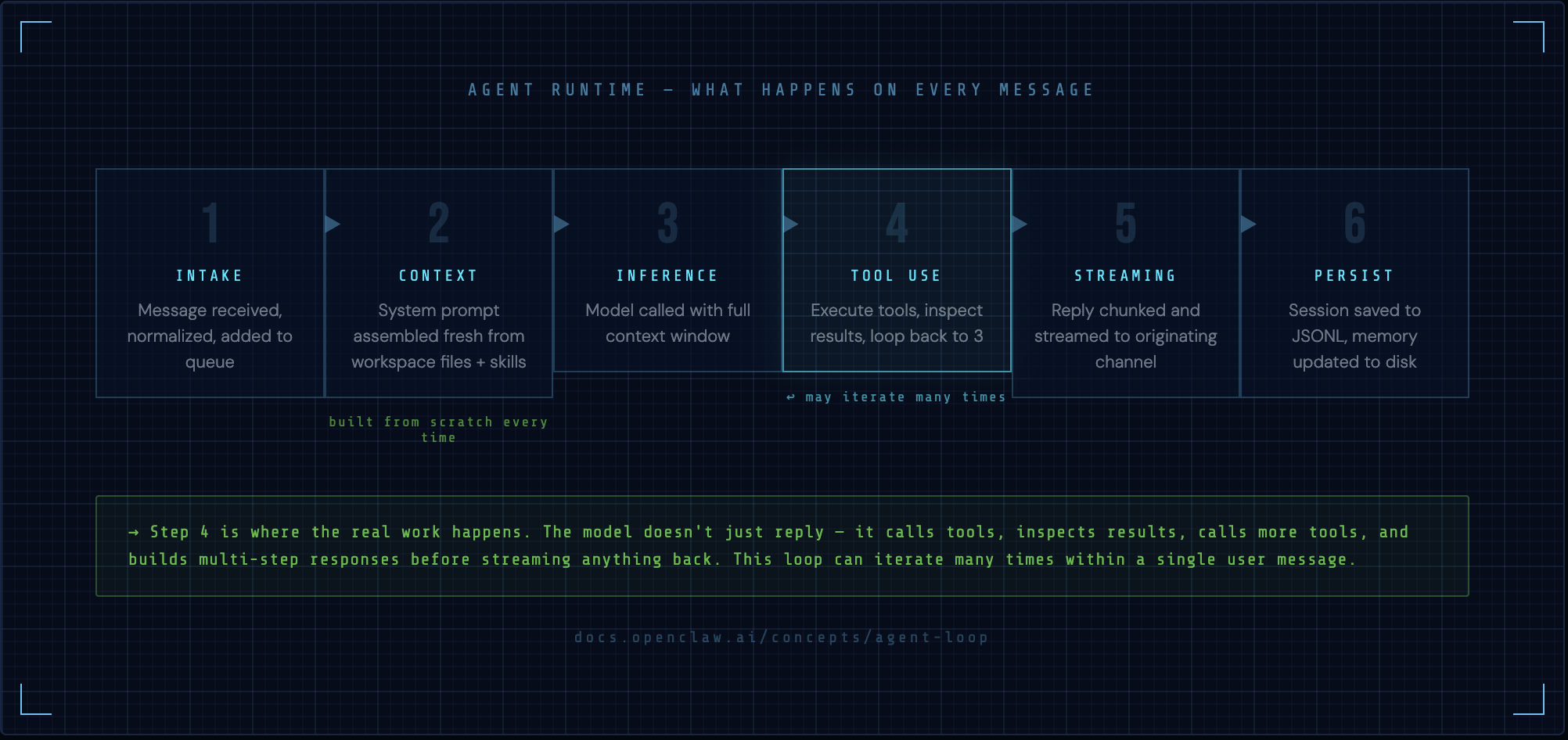
1. INTAKE        — message received, normalized, queued
2. CONTEXT       — system prompt assembled fresh from scratch
3. INFERENCE     — model called with full context
4. TOOL USE      — if model requests tools, execute them (may loop back to 3)
5. STREAMING     — reply chunked and streamed back to the originating channel
6. PERSISTENCE   — session saved to JSONL, memory updated
Step 4 is where the real work happens. The model doesn't just reply — it can call tools, inspect the results, call more tools, and build up a multi-step response before streaming anything back. This loop can iterate many times within a single user message.
How the system prompt is assembled
This is critical and most people don't know it: the system prompt is rebuilt from scratch for every single agent run. There is no persistent system prompt sitting in a database. The Gateway assembles it fresh each time from fixed sections, in this order:
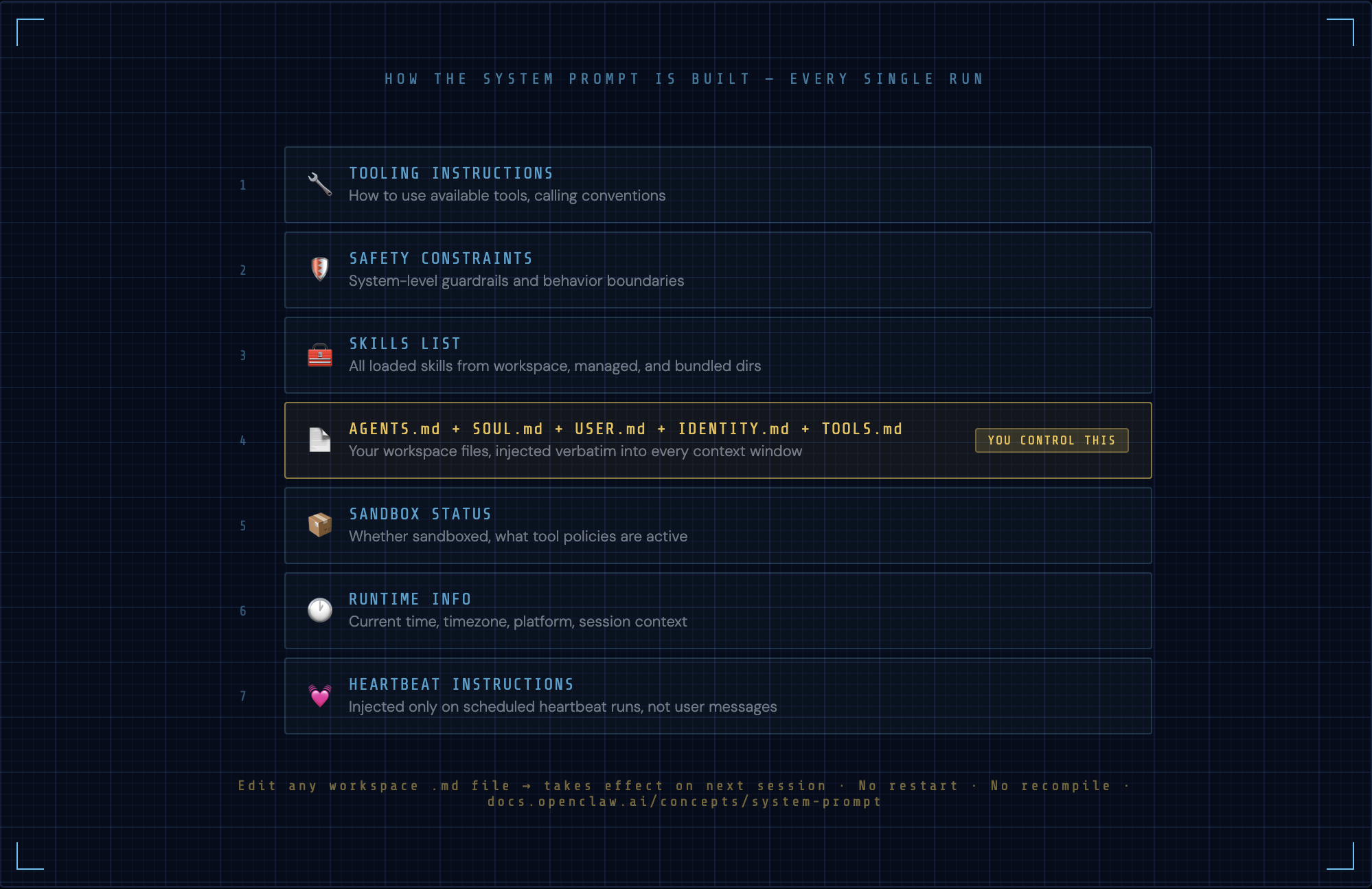
- Tooling instructions
- Safety constraints
- Skills list (from all loaded skills)
- Workspace files:
AGENTS.md,SOUL.md,USER.md,IDENTITY.md,TOOLS.md - Sandbox status (sandboxed or not, what's allowed)
- Runtime info (current time, timezone, platform)
- Heartbeat instructions (if this is a heartbeat run)
This is why AGENTS.md is so powerful — it's injected verbatim into every single context window. And it's why editing any workspace markdown file takes effect immediately on the next session, with zero restarts needed.
Model references use the format provider/model — e.g., anthropic/claude-opus-4-5, openai/gpt-4o, ollama/llama3.
Sessions and what they actually are
A session is a JSONL file. Each line is a JSON object representing one turn in the conversation. Sessions live at ~/.openclaw/agents/<agentId>/sessions/.
When a session gets too long (approaches the model's context window), compaction kicks in. The Gateway summarizes older turns and replaces them with a compressed representation, preserving the most recent context while keeping the session usable. You don't manage this — it's automatic.
Sessions are isolated per-conversation. The same agent can have hundreds of active sessions (one per DM thread, one per group, etc.) and each is managed independently.
→ Docs: Agent Loop | System Prompt | Session Management | Compaction
Layer 3 — Nodes: the body
Nodes are companion devices that connect to the Gateway WebSocket with role: "node". They're peripherals — they extend the Gateway's reach to physical devices.
A node can be:
- macOS — full companion app with menu bar, voice overlay, canvas WebView
- iOS / Android — mobile nodes with camera, microphone, location access
- Headless Linux/Windows — for remote screen control and system commands
What nodes expose as tool surfaces:
| Command | Description |
|---|---|
| canvas.* | WebView rendering (A2UI — agent-to-UI) |
| camera.* | Photo capture from device camera |
| screen.record | Screen recording on desktop nodes |
| system.run | Execute system commands on the node's OS |
| location.get | GPS coordinates from mobile nodes |
| audio.* | Microphone input, speaker output |
The pairing model
Nodes don't connect automatically. Every new device must go through pairing — a QR-code or token-based approval flow where the Gateway operator explicitly grants access. Once paired, the node's identity is stored and trusted on reconnect.
This is a security primitive, not a UX choice. The Gateway assumes that any unrecognized client attempting to connect is untrusted until explicitly approved.
→ Docs: Nodes Overview | Pairing | Talk Mode | Voice Wake
How channels actually work
22+ platforms run simultaneously. Every inbound message — whether from WhatsApp, Discord, or Signal — gets normalized into the same internal message format before touching the agent runtime. The agent doesn't know or care which platform the message came from. It just sees a message.
The DM policy system
Each channel has a policy that controls who can initiate conversations:
| Policy | Behavior |
|---|---|
| pairing | Only paired/approved contacts can message in |
| allowlist | Explicit list of allowed user IDs |
| open | Anyone can message (dangerous on public bots) |
| disabled | Channel is connected but not accepting messages |
Channel routing
When multiple channels are connected, the Gateway routes replies back through the originating channel. A message from your Telegram thread gets a reply on Telegram. A message from a Discord channel gets a reply on Discord. The routing is automatic and stateful per-session.
→ Docs: Channels Overview | Channel Routing
Memory: short-term, long-term, and semantic
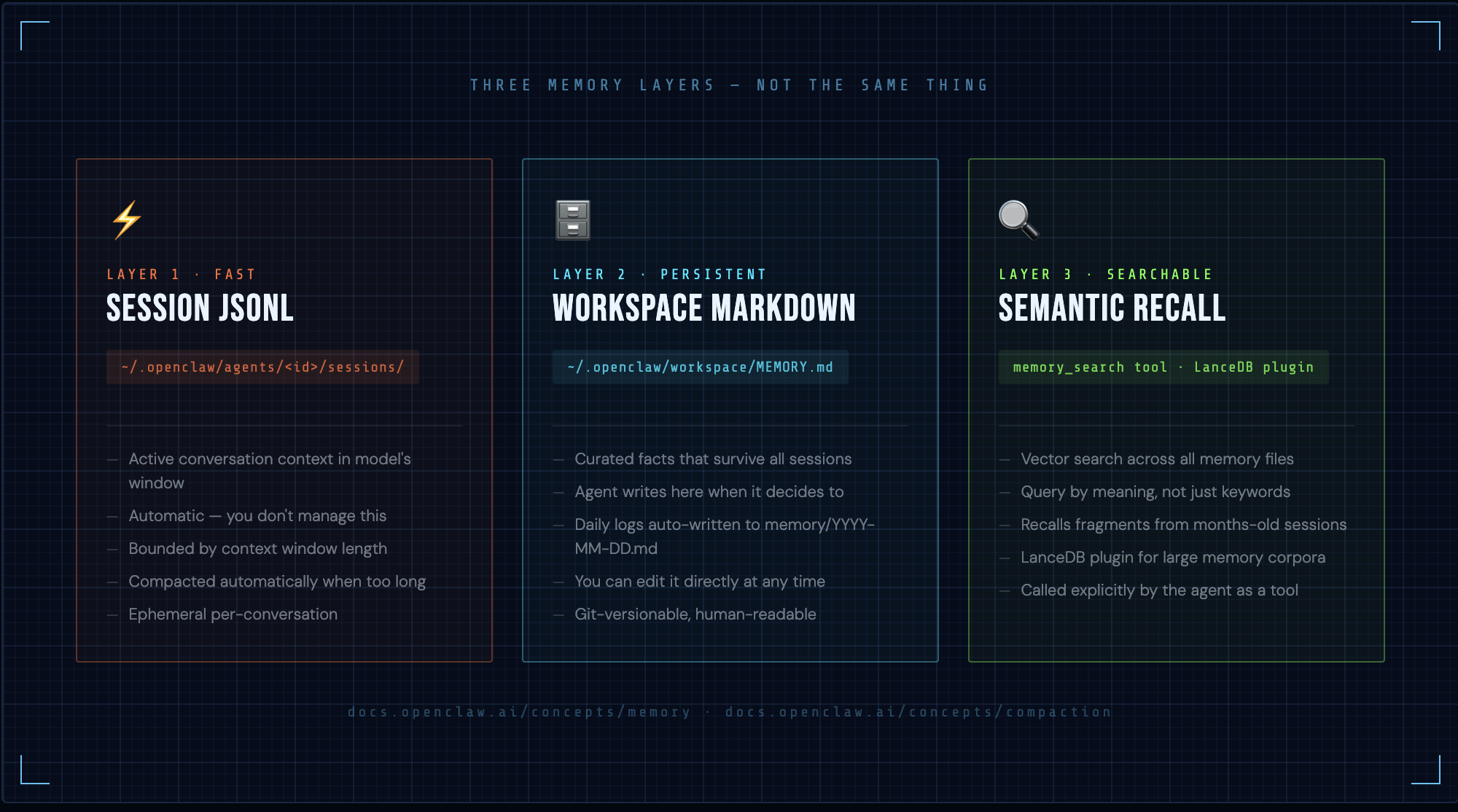
OpenClaw has three distinct memory layers and understanding all three matters.
Short-term: session JSONL
The active conversation context. Everything in the current session JSONL is in the model's context window (up to compaction limits). This is your working memory — fast, detailed, but bounded.
Long-term: workspace markdown
MEMORY.md is your curated long-term store. The agent can write to it directly. Important facts, user preferences, recurring context — anything that should survive across sessions lives here. The agent also writes daily logs automatically to memory/YYYY-MM-DD.md.
The key distinction: session JSONL is automatic and ephemeral. MEMORY.md is curated and permanent. The agent decides what's worth promoting to long-term memory, or you can tell it to.
Semantic: memory search
The memory_search tool enables vector-based recall across all memory files. The agent can query its entire memory corpus semantically — "what do I know about this user's project deadlines?" — and retrieve relevant fragments even if they're in sessions from months ago.
The LanceDB memory plugin (optional) extends this with a proper vector database backend for large memory corpora.
→ Docs: Memory | Compaction
The heartbeat: what makes OpenClaw an agent, not a chatbot
This is the feature most people enable but few configure properly.
The heartbeat runs a full agent turn — with full tool access — on a schedule. Default is every 30 minutes (1 hour with Anthropic OAuth). Nobody sends a message. The agent just wakes up, reads HEARTBEAT.md, and acts.
What a heartbeat turn looks like
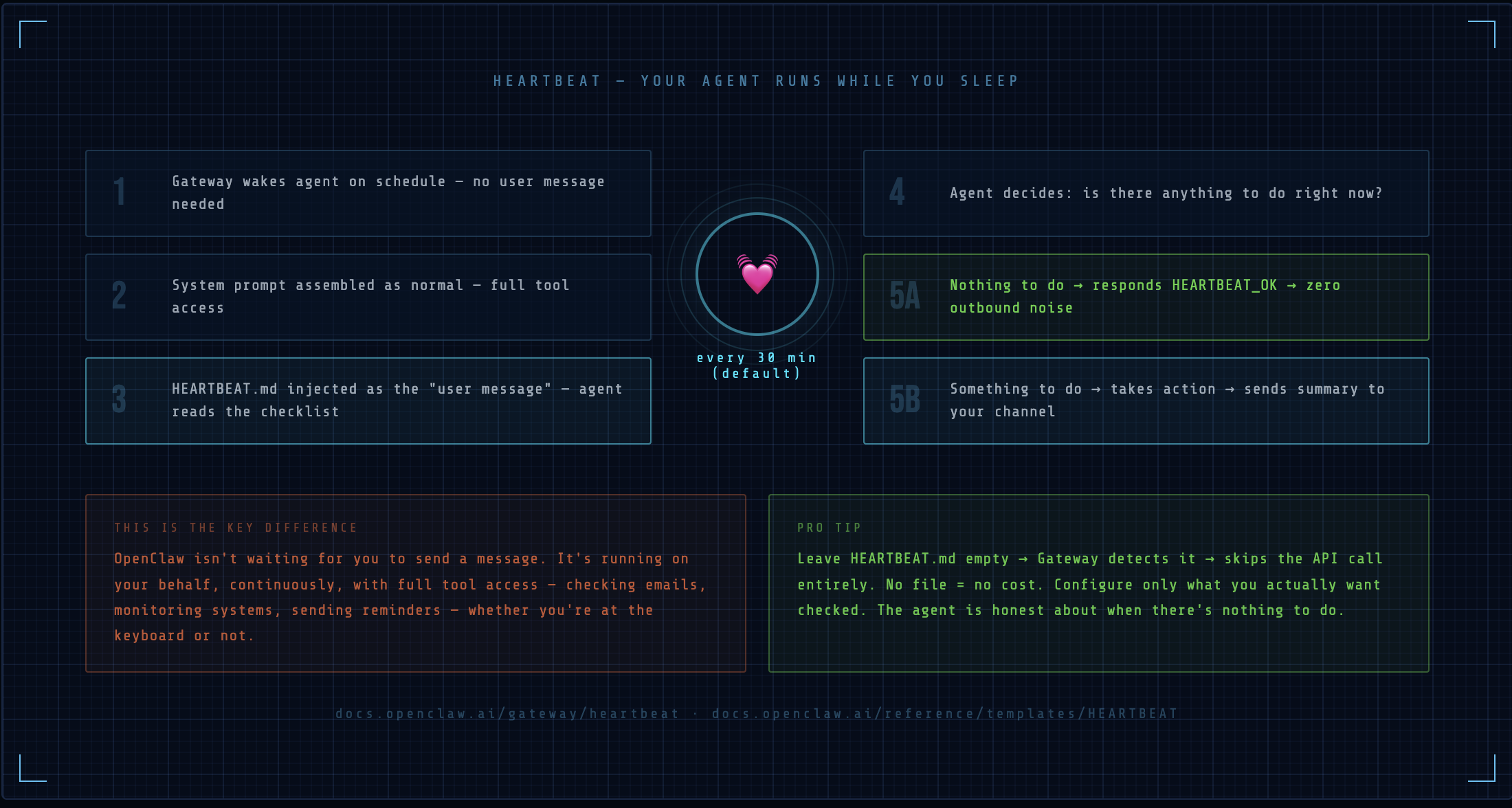
1. Agent wakes up (scheduled, not user-triggered)
2. System prompt assembled as normal
3. HEARTBEAT.md injected as the "user message"
4. Agent reads the checklist, decides what to do
5. If nothing to do: responds with HEARTBEAT_OK → no outbound delivery
6. If something to do: takes action, sends summary to configured channel
HEARTBEAT_OK is a special response that suppresses delivery. This means an idle heartbeat costs one API call but produces zero noise. Only meaningful heartbeats surface.
What to put in HEARTBEAT.md
- Check if any Telegram messages are unread and summarize them
- If it's Monday morning, send me a weekly agenda summary
- Check the weather for Bangalore and flag anything unusual
- If my last commit was more than 24 hours ago, remind me
- Otherwise, respond with HEARTBEAT_OK
Leave HEARTBEAT.md empty entirely to skip heartbeat API calls — the Gateway detects an empty file and skips the turn.
This is the architectural difference between OpenClaw and every other "AI assistant" you've used. It's not waiting for you. It's running on your behalf, continuously, whether you're at the keyboard or not.
→ Docs: Heartbeat | HEARTBEAT Template | Cron vs Heartbeat
Putting it together: the full picture
When you understand all three layers, OpenClaw starts making sense as a system rather than a collection of features:
- The Gateway is stateless infrastructure. It routes, schedules, and exposes APIs. It doesn't care what your agent does.
- The Agent Runtime is stateful intelligence. It reads your workspace files, maintains session memory, and executes tools. It doesn't care what channels are connected.
- Nodes are optional hardware extensions. They give the agent physical reach — cameras, microphones, screens, GPS. Plug in or unplug at any time.
These three layers are deliberately decoupled. You can swap model providers without touching channel config. You can add nodes without restarting the Gateway. You can edit workspace markdown without any reload at all.
That decoupling is what makes OpenClaw composable at scale — and what Article 3 is entirely about.
What's next
Article 3 goes deep on the advanced surface area: Talk Mode and Voice Wake, multi-agent routing across a single Gateway, running multiple Gateways on one host, cron automation, Docker sandboxing, and the Lobster workflow shell.
Article 4 covers what the community is actually shipping — 14-agent orchestration setups, grocery autopilots, IoT control, and how people are productizing their OpenClaw deployments.
All docs referenced: docs.openclaw.ai
Share
Post on social or copy the link to share anywhere.