18 min read
Advanced OpenClaw: Talk Mode, Multi-Agent, Sandboxing, and the Lobster Shell
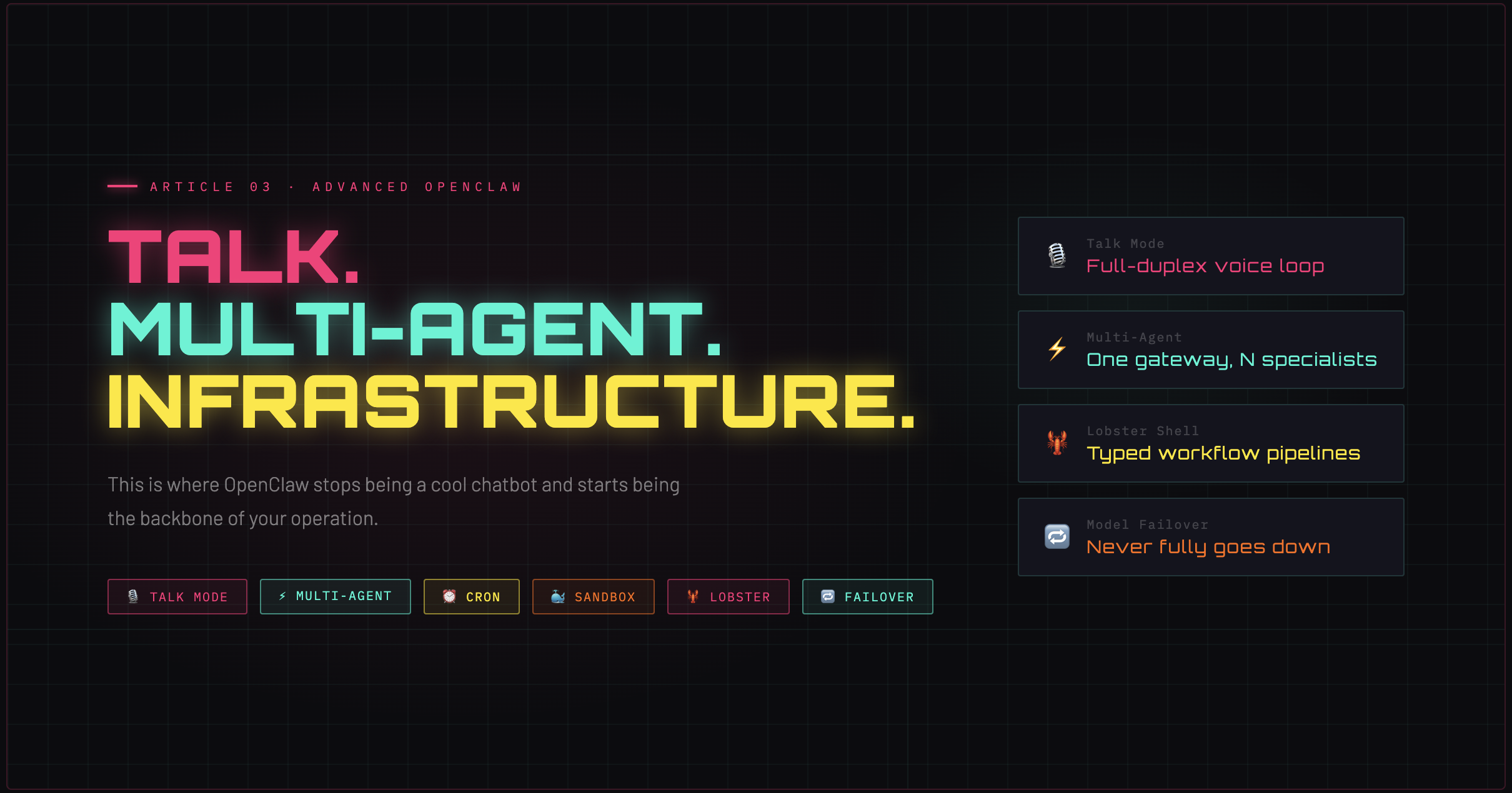
This is where OpenClaw stops being a 'cool chatbot' and starts being infrastructure. Talk Mode, multi-agent routing, sandboxing, cron automation, Lobster workflows, and model failover.
18 min read
Advanced OpenClaw: Talk Mode, Multi-Agent, Sandboxing, and the Lobster Shell
This is where OpenClaw stops being a "cool chatbot" and starts being infrastructure.
The surface area you haven't touched yet
If Articles 1 and 2 gave you a running agent with a solid mental model, you're already ahead of most OpenClaw users. But the features that make OpenClaw genuinely powerful — the ones that justify calling it an autonomous agent platform rather than a chatbot wrapper — are all in this article.
We're covering seven systems. Each one independently useful. Together, they compose into something that can run your life or your business in the background while you do other things.
1. Talk Mode: full-duplex voice interaction
Talk Mode is not a voice interface bolted onto a text system. It's a continuous full-duplex loop: listen → transcribe → process → speak. The agent hears you, thinks, and talks back — and if you start talking while it's mid-sentence, it stops and listens again.
How the loop works
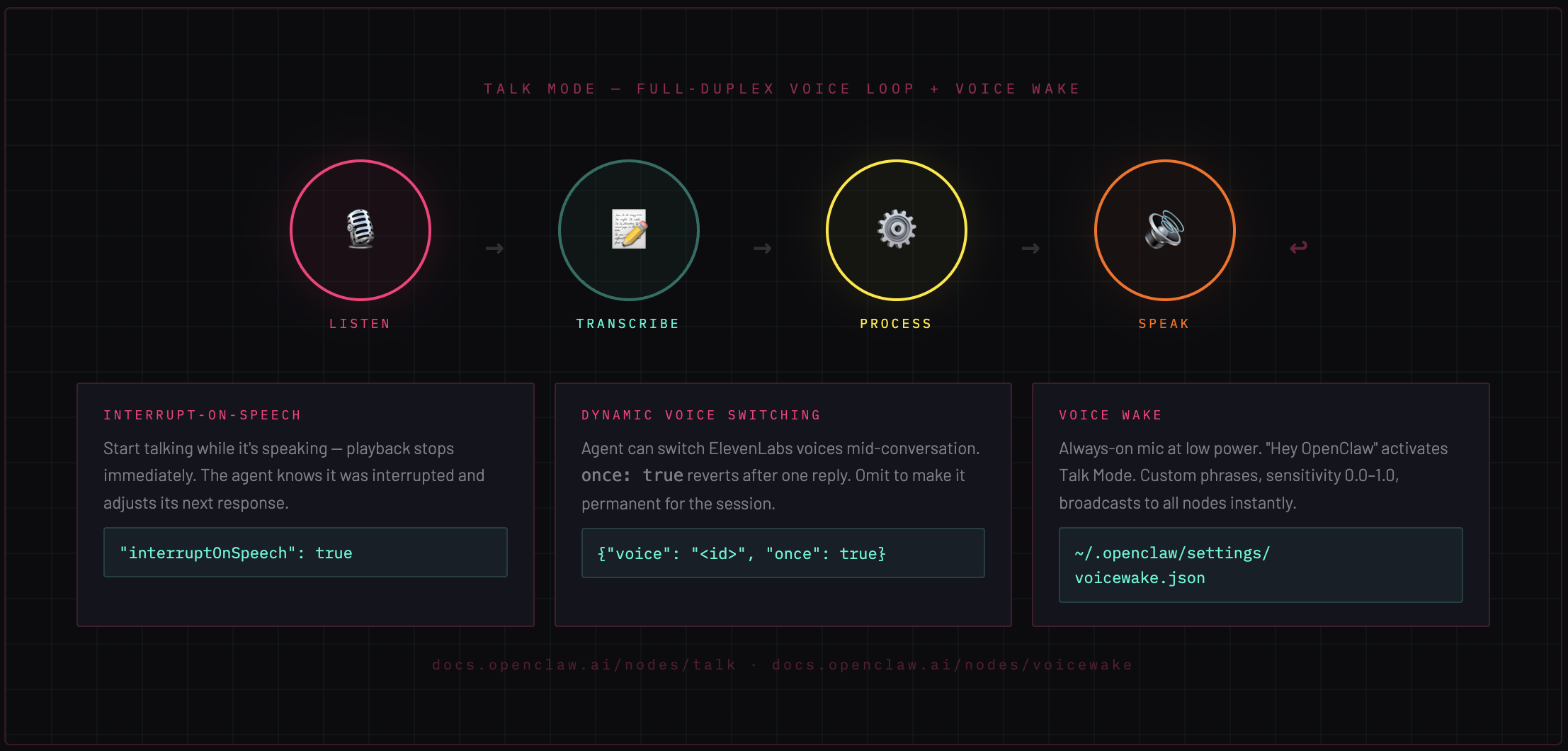
1. Listening  — microphone open, VAD (voice activity detection) running
2. Transcribe — speech-to-text converts audio to text
3. Process    — full agentic loop runs (tools available, memory accessible)
4. Speak      — ElevenLabs streaming TTS, audio plays back in real time
5. → back to Listening
On macOS, this presents as an always-on overlay with phase transitions you can see: Listening → Thinking → Speaking. The overlay is node-rendered — it lives on the macOS companion app, not the Gateway.
Interrupt-on-speech
By default, interruptOnSpeech: true. If you start talking while the agent is speaking, playback stops immediately. The interruption timestamp is noted in the session so the agent understands it was cut off. You don't have to wait for it to finish.
Dynamic voice switching
The agent can switch ElevenLabs voices mid-conversation by prefixing its reply with a JSON line:
{"voice": "<elevenlabs-voice-id>", "once": true}
once: true means it switches for this reply only, then reverts. Omit once to change the voice permanently for the session. Useful for multi-persona agents or contextual tone shifts.
Configuration
{
  "talk": {
    "voiceId": "your-elevenlabs-voice-id",
    "modelId": "eleven_v3",
    "outputFormat": "mp3_44100_128",
    "interruptOnSpeech": true
  }
}
→ Docs: Talk Mode
2. Voice Wake: always-on wake word detection
Voice Wake is the layer below Talk Mode. It keeps the microphone open at low power, listening for a trigger phrase. Say "Hey OpenClaw" (or any custom phrase you configure), and Talk Mode activates.
Wake words are stored at ~/.openclaw/settings/voicewake.json as a global list. They're editable from any connected node or app and broadcast to all clients immediately via the voicewake.changed event — no restart, no reload.
Sensitivity is configurable from 0.0 (permissive, triggers easily) to 1.0 (strict, requires clear pronunciation). Platform support: macOS, iOS, and Android.
The practical implication: your agent becomes ambient. It's not waiting for you to open an app or type a message. It's listening in the room.
→ Docs: Voice Wake
3. Multi-agent routing: one Gateway, many specialists
A single Gateway can host multiple isolated agents. Each agent has its own workspace directory, session store, auth profiles, model configuration, and tool policies. Isolation is total — agents cannot read each other's sessions.
Why multiple agents
The naive answer is "different personas." The better answer is specialization and access control.
A Marketing agent on Slack can have full web search and content tools but no exec or filesystem access. A Coding agent on Discord can have full tool access but a completely different system prompt and model (maybe a cheaper one for quick questions, expensive one for deep dives). A Family agent on WhatsApp can be locked to a specific allowlist and a gentle SOUL.md with no technical tools at all.
One Gateway. Three completely different agents. Zero cross-contamination.
How routing works
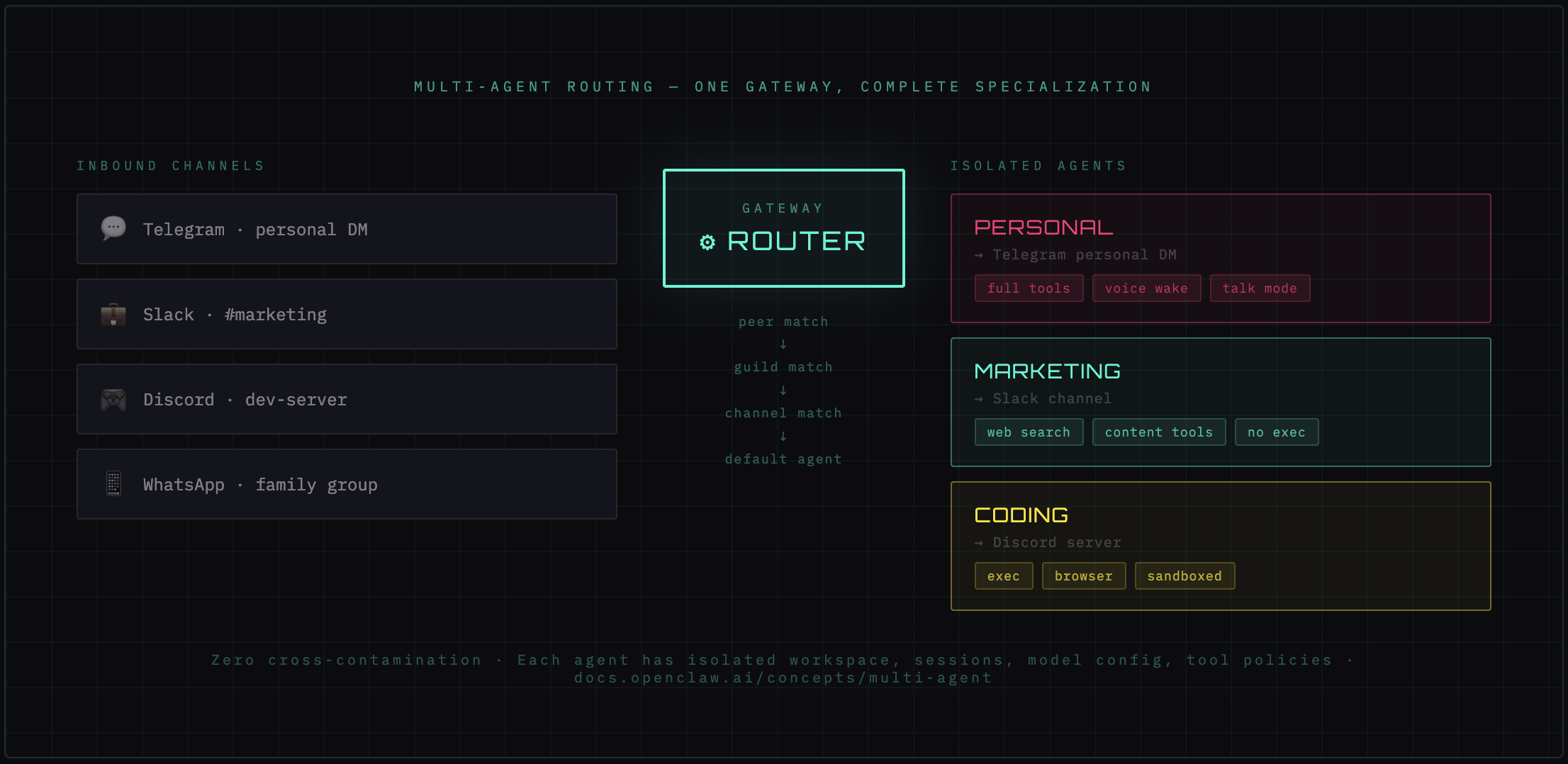
Routing is deterministic and most-specific-wins:
1. Peer match     — specific user ID → specific agent
2. Guild match    — specific team/group → specific agent
3. Account match  — specific channel account → specific agent
4. Channel match  — all messages from a platform → specific agent
5. Default agent  — fallback if nothing else matches
A message from your personal Telegram DM might route to your Personal agent. A message in your company's Discord server routes to the Coding agent. A message in a family WhatsApp group routes to the Family agent. All simultaneously, all on the same Gateway process.
Configuration pattern
{
  "agents": {
    "list": [
      {
        "id": "marketing",
        "workspace": "~/.openclaw/workspaces/marketing",
        "bindings": [
          { "type": "channel", "channel": "slack" }
        ]
      },
      {
        "id": "coding",
        "workspace": "~/.openclaw/workspaces/coding",
        "bindings": [
          { "type": "channel", "channel": "discord" }
        ]
      }
    ]
  }
}
→ Docs: Multi-Agent Routing
4. Multiple Gateways: when one isn't enough
Most setups will never need this. One Gateway handles multiple agents, multiple channels, and arbitrary complexity without strain. But there are legitimate reasons to run multiple Gateway processes on a single host:
- Strict isolation — one Gateway gets compromised, the other is unaffected
- Rescue bot — a minimal, restricted Gateway that stays running even when you're actively rebuilding the main one
- Redundancy — active-passive failover between two full Gateway instances
- Experimentation — test new config on a secondary Gateway without touching your primary
The profile approach
# Primary gateway
openclaw --profile main gateway --port 18789

# Secondary gateway (rescue/test)
openclaw --profile rescue gateway --port 19001
Each profile gets isolated: OPENCLAW_CONFIG_PATH, OPENCLAW_STATE_DIR, workspace root, credentials, and port. They share nothing.
The port spacing rule
This is the detail that bites people: leave at least 20 ports between base ports. The Gateway derives additional ports from its base:
| Derived port | Offset | Purpose | |---|---|---| | base + 2 | +2 | Browser control CDP proxy | | base + 4 | +4 | Canvas WebView | | base + 11 to base + 108 | +11–108 | CDP auto-allocation range |
If your ports overlap, two Gateways will fight over the same derived ports and both will misbehave. 18789 and 19001 gives you 212 ports of clearance — plenty.
→ Docs: Multiple Gateways
5. Cron jobs and automation
The heartbeat (Article 2) runs on a fixed interval. Cron jobs are the general-purpose scheduler — arbitrary timing, arbitrary scope, arbitrary delivery.
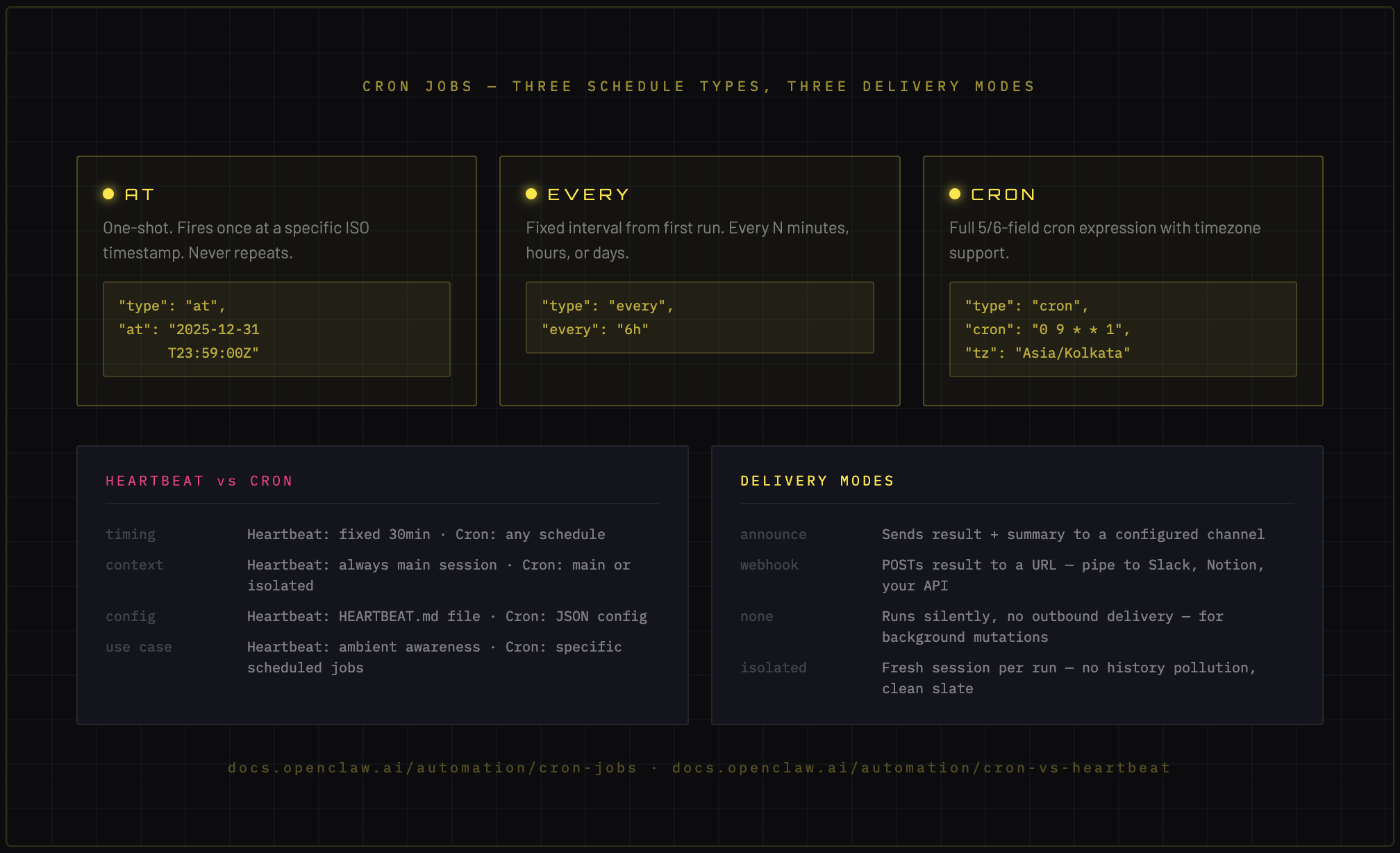
Three schedule types
at — one-shot. Fires at a specific ISO timestamp and never again.
{
  "type": "at",
  "at": "2025-12-31T23:59:00Z"
}
every — fixed interval. Fires every N minutes/hours/days from first run.
{
  "type": "every",
  "every": "6h"
}
cron — full cron expression with timezone support.
{
  "type": "cron",
  "cron": "0 9 * * 1",
  "tz": "Asia/Kolkata"
}
That last one fires every Monday at 9am Bangalore time.
Execution scope: main vs isolated
Main session — the cron job runs inside your primary conversation context. It has full session history and memory access. Use this for anything that should feel like a continuation of your ongoing relationship with the agent.
Isolated — a fresh session is spawned per run. No session history, clean slate. Use this for independent tasks that shouldn't pollute your main context — report generation, monitoring checks, batch processing.
Delivery modes
announce— sends result to a specific channel with a summarywebhook— POSTs the result to a URL (pipe to Slack, Notion, your own API)none— runs silently, no outbound delivery (useful for background mutations)
Heartbeat vs Cron: when to use which
| | Heartbeat | Cron | |---|---|---| | Timing | Fixed interval (30 min default) | Any schedule, any timezone | | Context | Always main session | Main or isolated | | Config | HEARTBEAT.md file | JSON config | | Use case | Ambient awareness, ongoing monitoring | Specific tasks, reports, one-shots |
If it's something your agent should always be vaguely aware of, use heartbeat. If it's a specific job with a specific schedule, use cron.
→ Docs: Cron Jobs | Cron vs Heartbeat
6. Docker sandboxing: limiting blast radius
Every tool your agent can execute is a potential attack surface. exec runs shell commands. browser controls a Chrome instance. system.run executes OS commands on nodes.
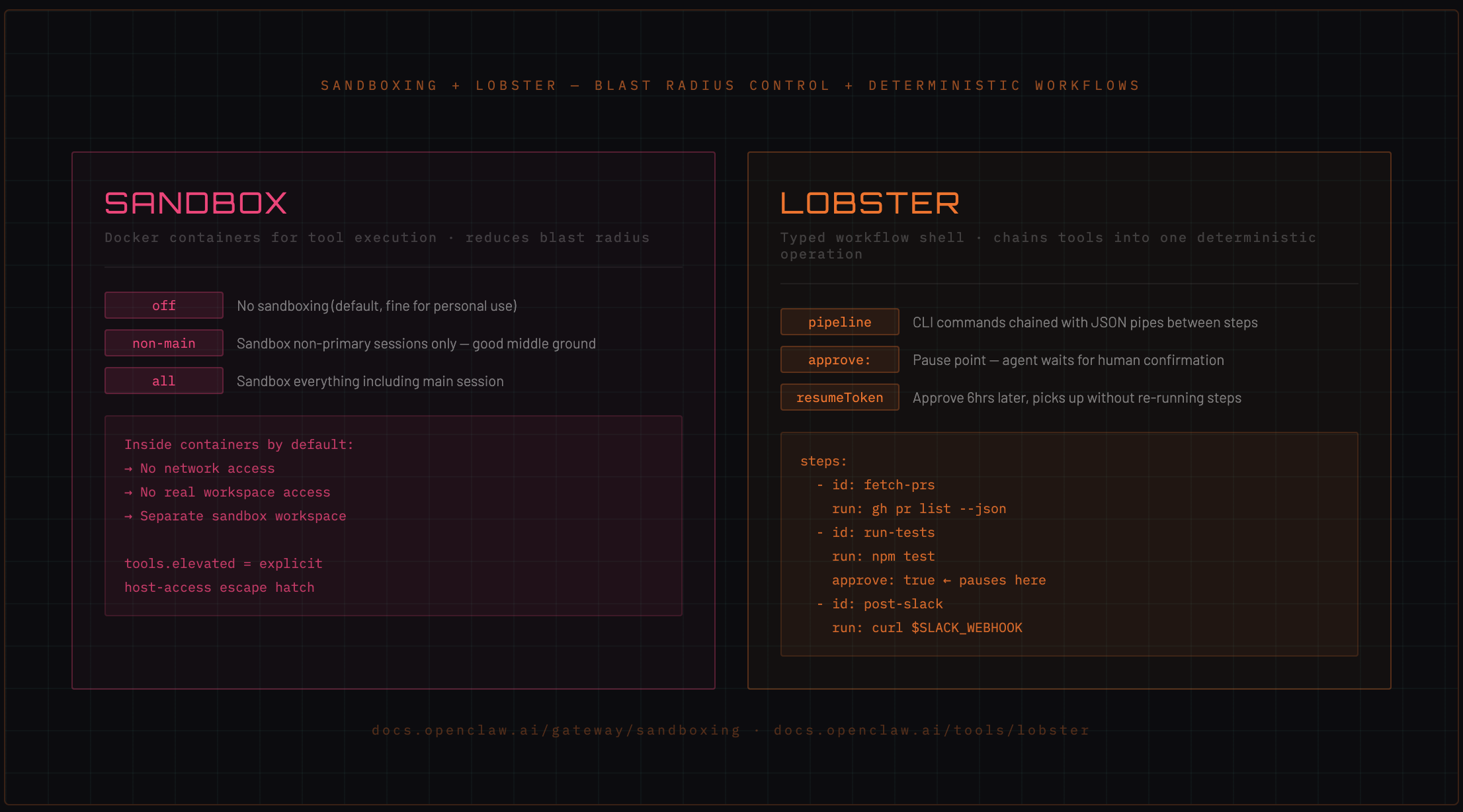
In an agentic loop with autonomous tool use, that's a lot of surface area. Sandboxing runs tool execution inside Docker containers to reduce blast radius. The agent still calls tools — it just doesn't know (or care) that those tools run in an isolated container.
Modes
{
  "gateway": {
    "sandbox": "non-main"
  }
}
off— no sandboxing (default, fine for personal use)non-main— sandbox only non-primary sessions (good middle ground for multi-agent setups)all— sandbox everything including your main session
What's restricted inside containers
By default, sandboxed containers have:
- No network access — the container cannot make outbound requests
- No workspace access — the agent gets a separate sandbox workspace under
~/.openclaw/sandboxes/, not your real workspace - Scope can be per-session, per-agent, or shared across agents
The elevated escape hatch
tools.elevated is the explicit list of tool calls that bypass the sandbox and run on the gateway host directly. This is intentional — some tools need host access (like writing to your real filesystem or making API calls).
By making elevation explicit, you know exactly what has host access and what doesn't.
{
  "tools": {
    "elevated": ["exec", "memory_write"]
  }
}
→ Docs: Sandboxing | Sandbox vs Tool Policy vs Elevated
7. The Lobster workflow shell
Every tool call costs tokens. A complex agentic task — say, "pull today's PRs, run tests on each, summarize failures, and post to Slack" — might involve 15–20 separate tool calls. That's expensive, and if any tool fails midway, you start over.
Lobster is a typed workflow runtime that chains tool sequences into a single deterministic operation.
What Lobster does differently
Instead of the agent making tool calls one at a time (with model inference between each), Lobster:
- Defines the entire workflow as a pipeline upfront
- Executes each step as a CLI command with JSON pipes between steps
- Supports explicit approval checkpoints where the agent pauses and waits for human confirmation before continuing
- Issues a
resumeTokenfor paused workflows — if you approve 6 hours later, it picks up exactly where it stopped without re-running completed steps
Inline pipeline syntax
# .lobster workflow file
name: pr-review-pipeline
steps:
  - id: fetch-prs
    run: gh pr list --json number,title,headRefName
  - id: run-tests
    run: npm test -- --filter="${steps.fetch-prs.output}"
    approve: true  # pauses here, waits for human confirmation
  - id: post-slack
    run: curl -X POST $SLACK_WEBHOOK -d "${steps.run-tests.output}"
Why approval gates matter
In an autonomous agent, approval gates are the difference between "assistant that suggests" and "assistant that acts without asking."
For destructive or expensive operations — sending emails, making API calls, deploying code — you want the agent to stop, show you what it's about to do, and wait.
The resumeToken means this pause is non-blocking. The agent saves state, notifies you (via whatever channel you're on), and waits. Approve on your phone 3 hours later, it continues. Reject it, it aborts cleanly.
→ Docs: Lobster
8. Model failover: building a resilient provider chain
Rate limits happen. Providers go down. Costs spike. A production-grade OpenClaw setup doesn't rely on a single model provider.
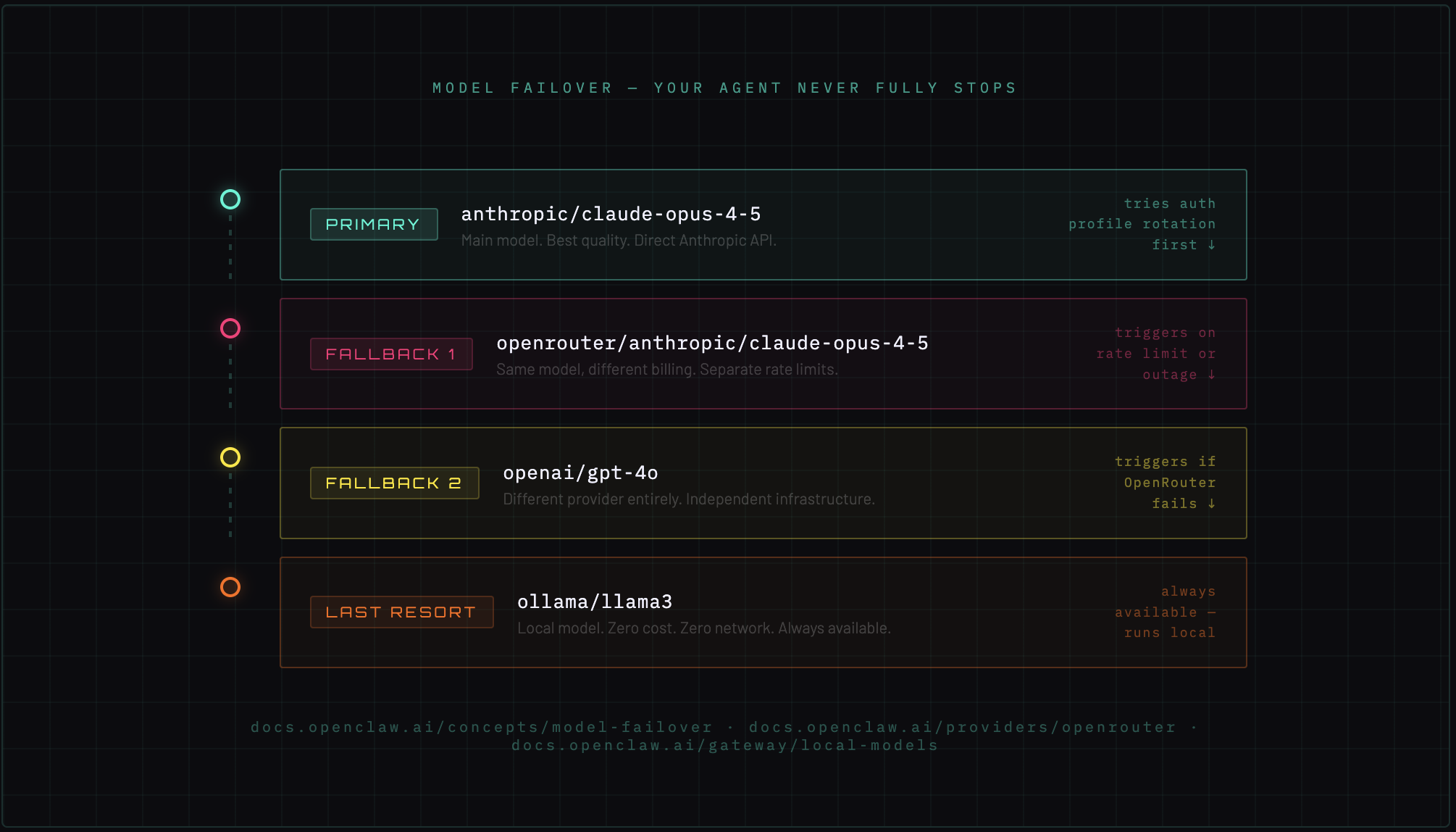
Failover operates in two stages:
Stage 1 — Auth profile rotation: If you have multiple API keys for the same provider (e.g., two Anthropic accounts), OpenClaw rotates between them on rate limit errors before escalating.
Stage 2 — Provider fallback chain: If all auth profiles for the primary provider are exhausted, it falls back to the next model in the chain.
Practical failover chain
{
  "agents": {
    "defaults": {
      "model": "anthropic/claude-opus-4-5",
      "fallbacks": [
        "openrouter/anthropic/claude-opus-4-5",
        "openai/gpt-4o",
        "ollama/llama3"
      ]
    }
  }
}
This chain reads: try Claude Opus first. If Anthropic is rate limiting, try the same model via OpenRouter (different billing, separate rate limits). If OpenRouter fails, fall back to GPT-4o. If everything is down, run Llama 3 locally via Ollama — zero cost, zero network dependency, always available.
The local model fallback is the critical piece for production use. Your agent never fully stops working.
→ Docs: Model Failover | OpenRouter | Ollama/Local Models
Composing it all together
These seven systems aren't independent features — they're composable primitives.
A real production setup might look like:
- Three agents on one Gateway (Marketing on Slack, Coding on Discord, Personal on Telegram)
- Talk Mode active on the Personal agent, Voice Wake running on the macOS node
- Sandboxing set to
non-mainfor the Coding agent (untrusted code execution goes in a container) - Cron jobs running Monday morning reports, daily GitHub PR summaries, and weekly cost breakdowns
- Lobster workflows for any multi-step operation that touches production systems
- Failover chain: Claude Opus → OpenRouter → GPT-4o → local Llama as last resort
That's not a chatbot. That's an agent infrastructure stack. And it runs on a $20/month VPS or your local machine.
What's next
Article 4 is the payoff: what the OpenClaw community is actually building and monetizing. 14-agent orchestration setups. Grocery autopilots. IoT control systems. Phone bridges. And how people are productizing all of it.
All docs referenced: docs.openclaw.ai
Share
Post on social or copy the link to share anywhere.